BYOD game streaming that works with your phone or any RTMP camera. Parents watch live from anywhere. Game film is ready to watch minutes after the final whistle — not the next morning — and the saved replay starts right at kickoff.
No proprietary hardware. No per-camera licence. You pay the video costs you actually use, at cost.
Stream directly from the native mobile app. One tap to go live. Uses the EdgeRtmp module for high-quality RTMP streaming straight to viewers. Perfect for volunteer parent camera operators.
Register any RTMP-compatible camera. Configure once, stream to every game automatically.
The stream doesn't just end and disappear into an overnight queue. It's a game record you can watch, mark, and clip the same evening.
Parents and family get a shareable link to watch live from any browser — no app download needed. Works on phones, tablets, and computers.
Game film is ready to watch as soon as the final whistle blows — no overnight processing queue. It streams adaptively, so it still plays smoothly on a phone in the parking lot on cell data, not just on club wifi.
The camera can go on 40 minutes early and nobody has to pay for it later — tap Kickoff when the whistle blows, or let it happen automatically off the game clock, and the saved replay opens at kickoff instead of at warmups.
The coach can drop a mark from the tracker mid-game, and anyone watching live can mark a moment too. Every mark lands on the film timeline afterward, labeled by who made it — coach or spectator — so review starts where people actually pointed, not at 0:00.
Want the last shot back before the restart? Clip the last 30 to 60 seconds of the live broadcast from Sideline mode, or right inside the game tracker — no waiting on the archive, it comes off the broadcast that's still running.
Cut a clip in two taps, on a phone or on the web. The link you hand out plays only that clip — not the rest of the game — so sharing one save with the grandparents doesn't mean sharing the whole match.
Every stream is saved automatically. You decide how long a game is kept, and retention is the main thing that drives what storage costs — nobody's paying to store a scrimmage from three seasons ago by accident.
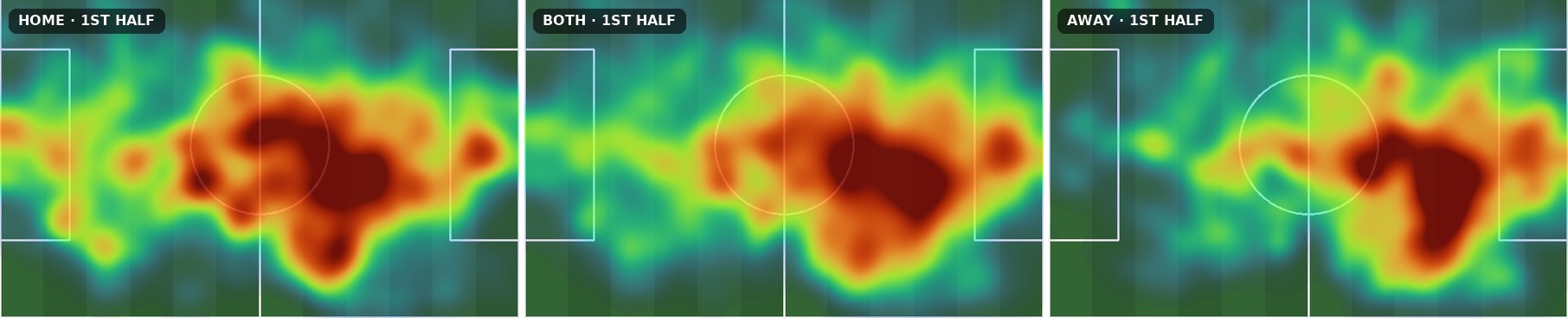
Every saved game can be turned into numbers on the game page: possession, territory, heat maps by half, and player distance. No export, no outside service, no camera-company analysis tier. See Film to Numbers below.
Point Edge at a saved game and it tracks every body and the ball, places them on the pitch in yards, and reports what a coach actually asks after a match. It works on an Edge stream, a registered camera, or a Hudl export you upload.
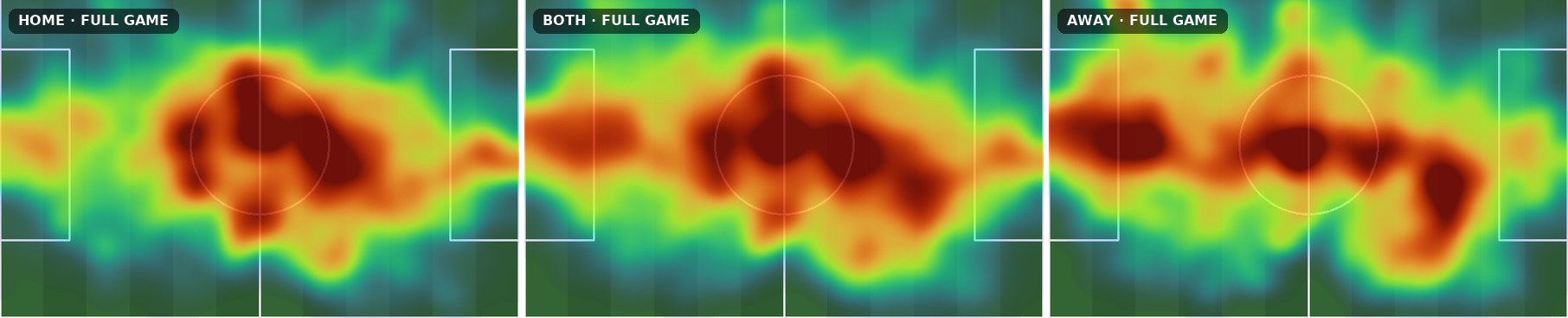
Possession, territory by thirds, passing zones, and heat maps for each team and each half. A coach confirms which colour is which from a row of pictures, and the rest is automatic.
Add jersey reads to a game and get names on the track: minutes on film, distance in yards, top speed in mph, sprints, and per-player maps. A short "who is this?" list lets the coach settle the doubtful ones.
Mark the pitch corners and kickoff on the video once. That single step is what lets heat maps and distances come out in real yards instead of camera pixels, on any camera angle.
Team stats run on a few dollars of GPU time per game; player stats add a few more for the jersey reads. Both are switched on per club, and a game is only analyzed when a coach asks. Manual tagging services charge around $1,000 per team per season for a comparable set of numbers.
We check our numbers against professionally tagged film from the same games. Possession and heat maps are the strongest today; pass counts are still catching up to a human tagger, and we say so in the app rather than round up.
| Platform | Annual Cost | Hardware |
|---|---|---|
| Trace | $2,000–3,300/team | Proprietary |
| Veo | $2,800+ first year | Proprietary |
| Hudl | $4,000/camera/yr | Proprietary |
| Soccer Edge | Metered usage, at cost | BYOD — any camera |
Those are per-team and per-camera licences you pay whether you use them or not. Edge has no licence — you pay for the video you actually stream and store.
The rest of the platform costs about the same whether your club has twenty players or two thousand. Video does not, and we would rather you knew that before you turned it on than after the first invoice.
Every hour of live video is encoded and delivered by Mux, and billed by the hour. Two teams streaming a game each on a Saturday costs roughly twice what one does.
Archived games sit in storage and are billed for as long as you keep them. Retention is a setting, and it is the lever most clubs should actually reach for.
Delivery is billed too, so a game forty families watch live costs more to serve than one watched by four. Popular games are good news that is not free.
A large club streaming everything can run up a real bill. A club with 200 teams putting every game online is buying thousands of hours of encoding, storage and delivery, and no amount of good intent makes that cheap. It is still far less than $4,000 per camera per year — but it is not a rounding error, and calling it a nominal fee would have been dishonest.
What we can promise is that there is no markup and no licence: you pay what Mux and Azure charge us, you can see what is driving it, and you decide which teams stream and how long games are kept. Tell us roughly how many teams you have and how often you would stream, and we will work out an actual number with you rather than quote you a slogan.
At-cost pricing for nonprofit youth soccer clubs. No per-player fees, no contracts.